
An Anybox alternative with AI retrieval
Recall vs
Anybox
Recall and Anybox both make sense for an Apple-device collection. The useful question is how you want to return to a link: through a remembered idea, a spoken description, or the tools you build into your desktop routine.
Compare the detailsComparison by Recall · Updated September 17, 2026
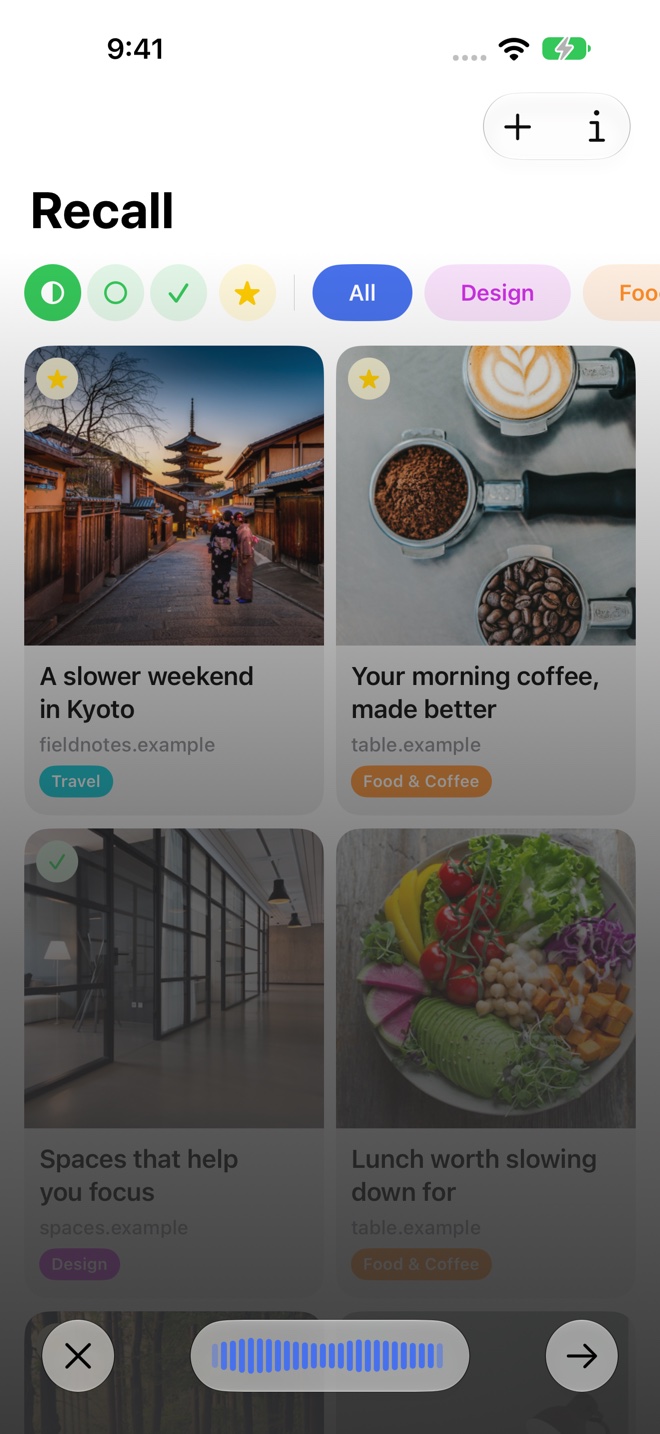
At a glance
Scroll sideways to compare →
| What matters | Recall | Anybox |
|---|---|---|
| Devices and sync | Native iPhone, iPad, and Mac apps with iCloud sync. | Native Apple apps with CloudKit synchronization. [2] |
| Finding a link | Semantic search and spoken descriptions through Voice Recall. | Quick Find and configured Quick Link keywords. [2] |
| Organization | Folders, favorites, reading status, notes, and AI-generated topics. | Nested tags and folders, plus rule-based Smart Lists. [1] |
| Saved context | Page summaries and insights, with notes attached to links. | Link metadata and notes; webpage archives as PDF, Web Archive, or screenshots. [2] |
Remembering an idea or building a shortcut
Anybox’s Quick Find opens from a keyboard shortcut and offers actions on your results. Quick Link lets you assign a keyword to a frequently used address.
Recall gives you another route when the page’s subject is what you remember. Search for “spaces that help me focus,” or use Voice Recall to describe the link aloud. This can be useful for an article you saved once and have not needed for several weeks.
Decide how you want your library organized
Anybox documents nested tags, folders, and Smart Lists. Those are useful to assess if you want lists assembled from rules or a detailed hierarchy.
With Recall, choose folders around a project or interest. AI adds topics that describe the saved page, while favorites and reading status help you decide what to return to next. Your own notes preserve the reason a source mattered.
For example, a Design folder can hold several office references. A note about the lighting or layout gives each reference context beyond its thumbnail. See Recall’s organization tools.
An archive and a summary serve different needs
Anybox’s archiving tools can preserve pages in several formats. Consider that workflow when retaining a copy of a source is central to your collection.
Recall’s summaries and insights help you recognize and review saved content. Open the original link when you need the full context. The detail view brings the AI overview and your own notes together.
Choose around the moment you need the link
We would consider Anybox for a desktop routine built around saved addresses, keyboard access, and archiving. Consider Recall when you want help understanding saved pages and finding them through the ideas you remember.
Both use Apple’s ecosystem, so iCloud alone does not decide this comparison. For Recall, check the Apple Intelligence and device requirements, then consider whether summaries, semantic search, and voice retrieval match your needs.
Sources and review
Published by Recall. Competitor details were checked against the official pages below on September 17, 2026. Recommendations about which app fits a workflow are our assessment.
A few useful details
Questions about Recall vs Anybox.
Do Recall and Anybox both use iCloud?
Yes. Recall synchronizes its library through iCloud, and Anybox documents synchronization using Apple’s CloudKit service.
Does Recall assign folders automatically?
You choose Recall’s folders. AI creates topics, summaries, and insights for the saved page.

Save it for later.
Find it when it matters.
Get Recall on the App Store Requires iOS 26, iPadOS 26, or macOS 26 or later and a compatible device with Apple Intelligence enabled. iCloud account required for sync. Microphone permission required for Voice Recall.