
Recall for iPhone
Save a good find.
Keep moving.
Send a link to Recall from the share menu. Your articles, recipes, and useful finds stay together until you have a moment to come back to them.
See how it works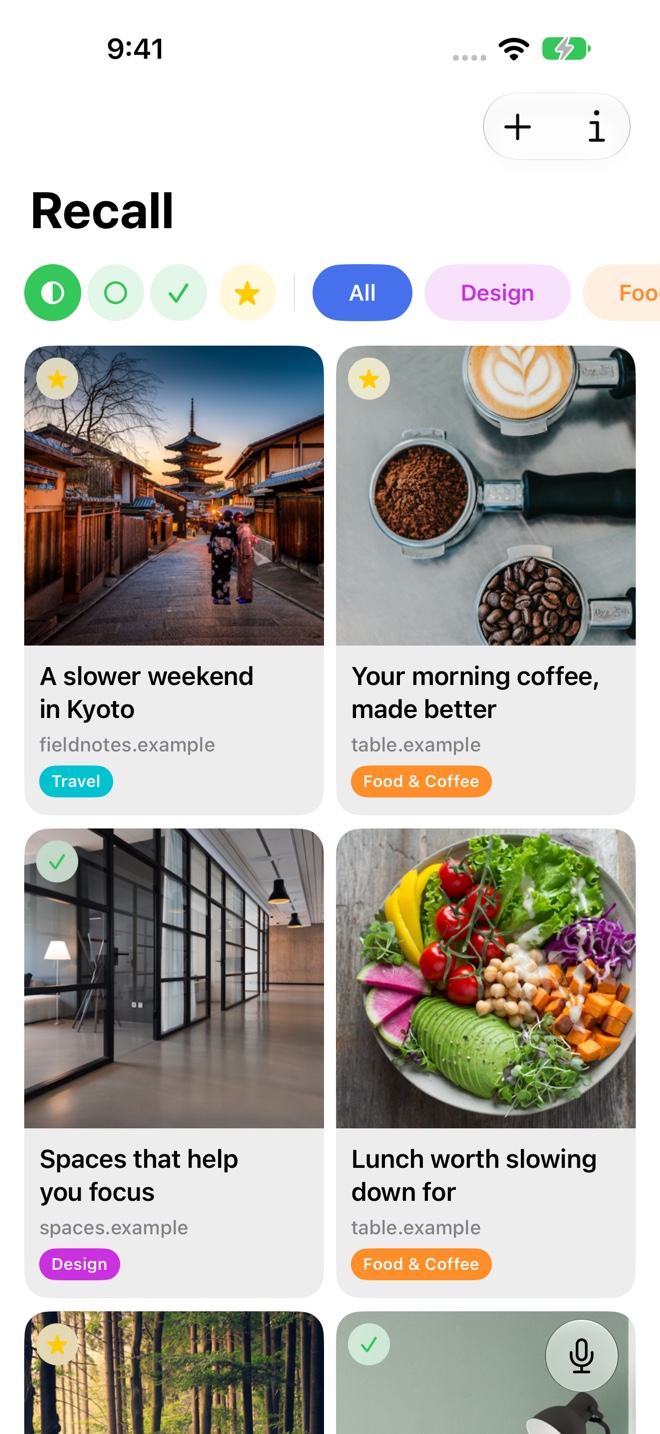
Make a spare minute useful
Open a saved item to review its summary, topics, and key insights. See whether it deserves a closer read, add a note, or mark it as read.
Organize recipes, travel research, and work references into folders that make sense to you. Favorites keep the links you want to return to especially easy to recognize.
Describe the link when the title escapes you
Voice Recall lets you speak a description such as “Find that article about the morning coffee routine.” Use typed search when you want to browse the matching results yourself.
Recall requires iOS 26 or later on an iPhone that supports Apple Intelligence, with Apple Intelligence enabled. Voice Recall requires microphone permission.
Return to it on a larger screen
Your library can sync through iCloud to iPad and Mac. Save a source while you are out, then return to the same collection when you sit down to read or work.
A few useful details
Questions about Recall for iPhone.
Where do I save a link from Safari?
Use Safari’s share menu and choose Recall. If Recall is not visible, check the available apps in the share sheet, or copy the address and paste it into Recall.
Can Recall find a link I have not saved?
Search and Voice Recall work with your saved Recall library.
Save it for later.
Find it when it matters.
Get Recall on the App Store Requires iOS 26, iPadOS 26, or macOS 26 or later and a compatible device with Apple Intelligence enabled. iCloud account required for sync. Microphone permission required for Voice Recall.