
For ideas worth returning to
Keep the reference.
Remember the reason.
A useful design reference is often more than its image. Save the link, keep the source, and add the detail that made you want to return to it.
See how it works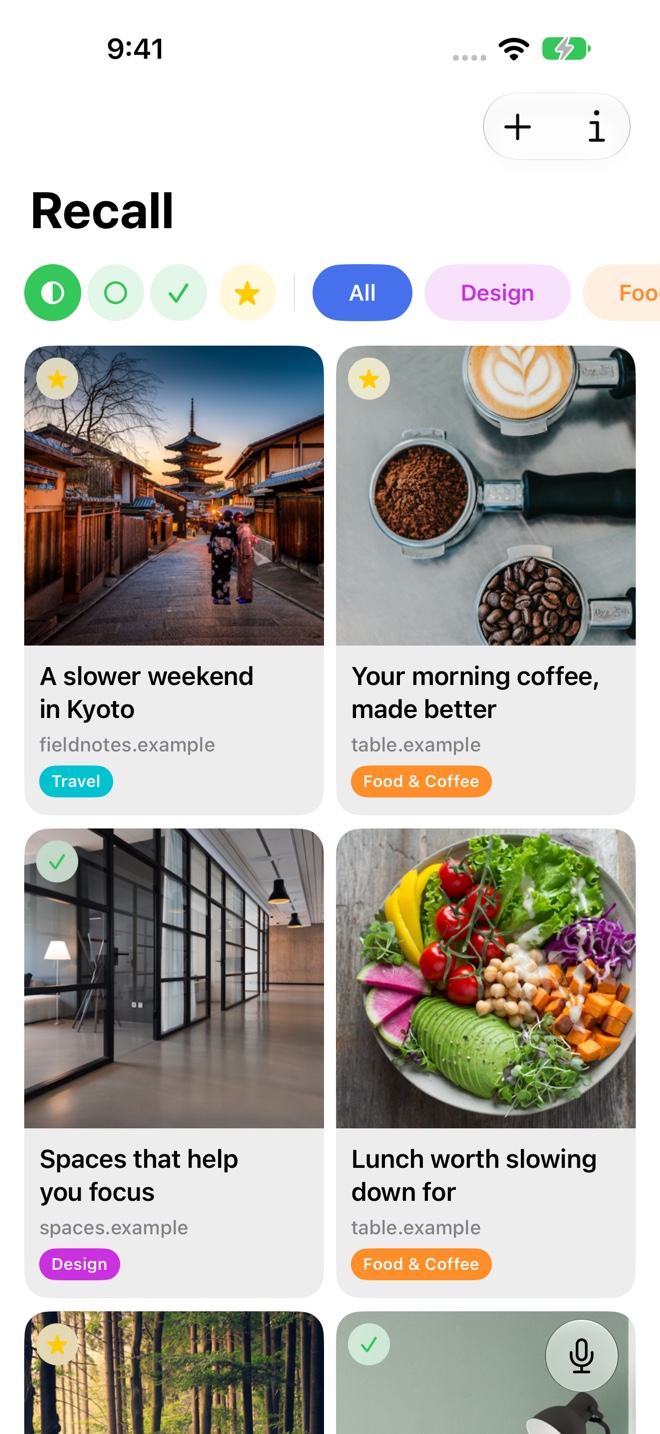
Collect the page behind the idea
Save a studio article, an interiors reference, a typography resource, or a write-up about materials. Keeping the web link gives you a route back to the original context.
Organize references into a project folder or a continuing interest. You can separate a specific brief from a broader collection of ideas.
Add the observation a thumbnail cannot hold
A personal note can explain whether you saved a page for its layout, material choices, or an argument in the text. That small amount of context is useful when a reference becomes relevant weeks later.
AI summaries describe the page. Your own notes preserve what you saw in it.
Find the idea in your own words
Search for a remembered subject such as “spaces that help me focus.” Semantic search gives you a way to rediscover a saved article even if its title is gone from memory.
Related links can surface other saved sources worth revisiting. Keep the source and attribution when sharing a reference with someone else.
Build a source collection that stays useful
Use Recall on Mac alongside the work you are doing, or browse references on iPad. iCloud sync connects the links you collected on your phone.
Keep references with their original context, then return to the source when an idea becomes part of your project.
A few useful details
Questions about Design inspiration.
Can I keep notes about why I saved a design reference?
Yes. Add a note to a saved link and organize it in a folder for the project or subject.
Can I find references from more than one project?
Search your saved library by topic, or explore related links while viewing a source. Folders keep each project’s chosen collection together.
Save it for later.
Find it when it matters.
Get Recall on the App Store Requires iOS 26, iPadOS 26, or macOS 26 or later and a compatible device with Apple Intelligence enabled. iCloud account required for sync. Microphone permission required for Voice Recall.