
Find it by what you remember
The idea is enough
to start searching.
You remember a quiet place in Japan. You do not remember the title of the article. Search your saved links in your own words and let Recall find relevant results.
See how it works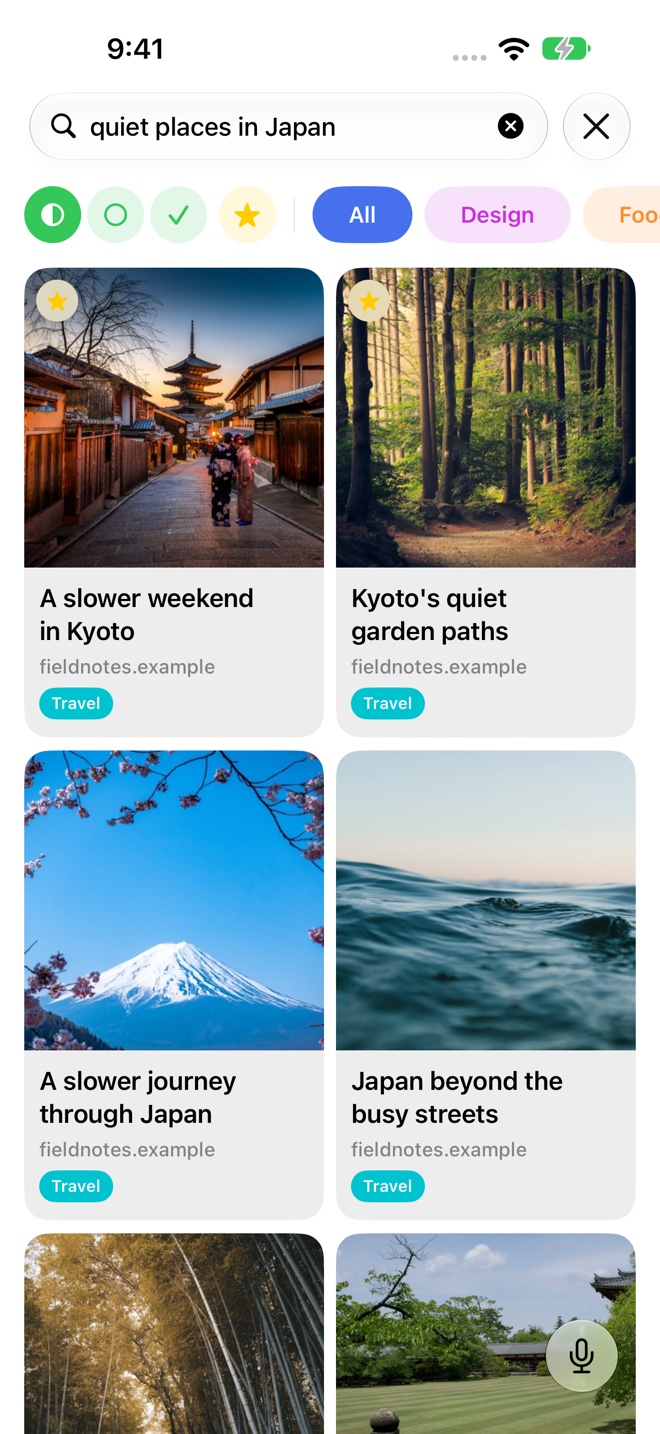
Search the subject, not just the title
Recall uses words and meaning to search your library. A phrase such as “quiet places in Japan” can surface a saved Kyoto article even when the title does not contain that exact phrase.
Start with the detail you remember: a place, a topic, or the reason a page was useful. You can still search with an exact word or title when you know it.
See the links that fit
Search gives you results to browse. Preview images and titles help you recognize the page you had in mind, while folders provide context for where it belongs.
The example shown here uses a sample travel collection. Your results come from your own saved library, so the links you have saved determine what Recall can find.
Use a little context
Try a phrase such as “coffee routine,” “spaces that help me focus,” or “a slower trip through Japan.” A useful phrase describes the content rather than repeating a guess at its title.
When you want one link opened for you, Voice Recall lets you speak your description. When you want to compare several results, keep using search.
Built around the library you have saved
Recall prepares saved content for semantic search on your device. Newly added links may need time to finish processing before their analysis can contribute fully to results.
Keep source links and personal context together with folders and notes, then search when you need to return to them.
A few useful details
Questions about Semantic search.
Does Recall search the whole web?
This search finds links in your saved Recall library. It is not a replacement for a web search engine.
Do the words need to appear in the title?
No. Semantic search can find relevant content by meaning, alongside word-based matches. Results depend on the saved content available in your library.
Save it for later.
Find it when it matters.
Get Recall on the App Store Requires iOS 26, iPadOS 26, or macOS 26 or later and a compatible device with Apple Intelligence enabled. iCloud account required for sync. Microphone permission required for Voice Recall.