
Say it. Recall it.
Describe the link.
Go right to it.
With Voice Recall, describe the link you want to find. Recall searches your saved library and takes you to the matching link.
See how it works“Find that article about the morning coffee routine.”
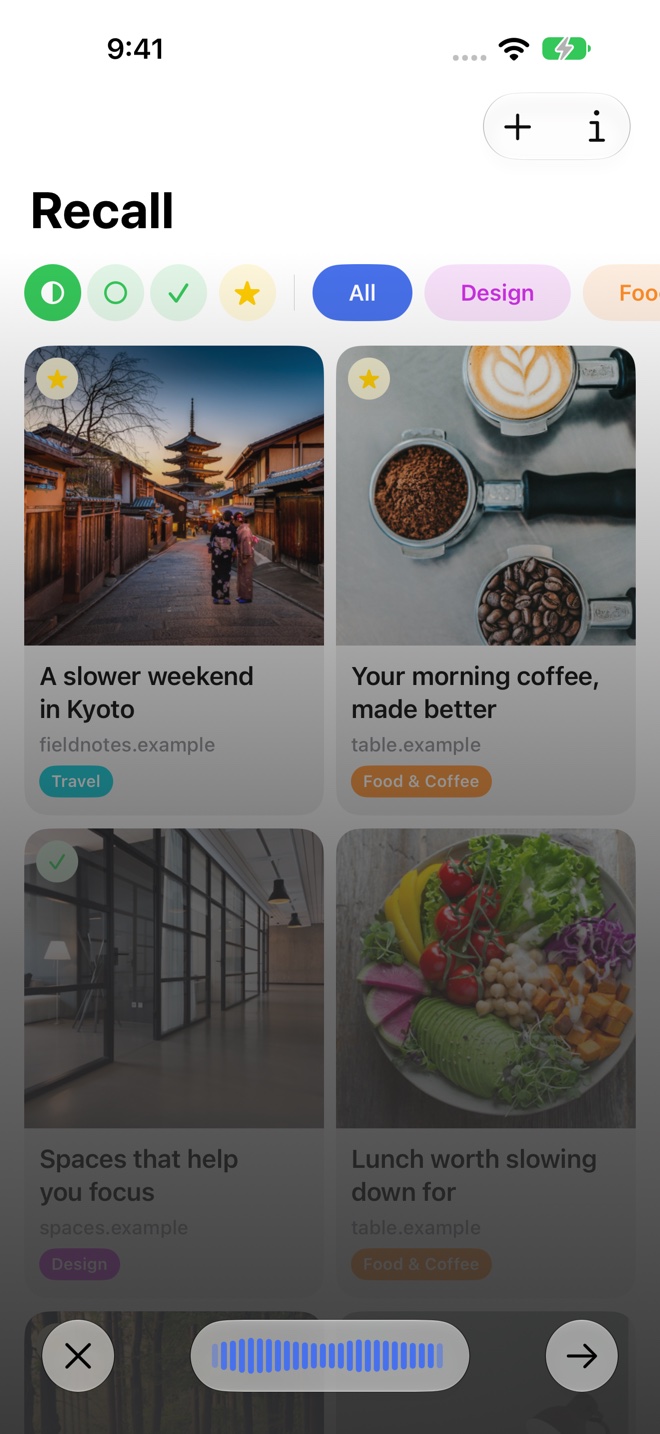
Say what made the link memorable
Start Voice Recall and describe the page. You might remember its subject, a place it mentioned, or why you saved it. A natural description gives Recall context to work with.
You can try “Find that article about the morning coffee routine” or “Open the link about spaces that help you focus.” The example is a request to search your library; it does not add a new page from the web.
Go from a spoken thought to a saved link
Your device turns your speech into text. Recall uses that text to search the library and choose a matching saved link. The workflow is designed for the moment when you want to return to one item.
Use typed search when you would rather browse several results. Both features work with the links you have already saved.
You control the recording
Voice Recall asks for microphone access. Recording begins when you start the feature and ends when you stop or cancel it. You can change microphone permission in your device’s settings.
Speech transcription runs on your device. Transcribed requests can be included in Recall’s diagnostic reports; the privacy policy explains the distinction between speech processing and diagnostics.
A clearer description helps
If the selected link is not the one you meant, try adding a more specific detail or use typed search to inspect the candidates. Recall can only choose from content in your library.
Voice Recall works alongside AI summaries and your own organization, so a growing collection remains useful when you return to it.
A few useful details
Questions about Voice Recall.
What should I say to Voice Recall?
Describe the subject, a detail you remember, or the reason you saved the link. For example: “Find that article about the morning coffee routine.”
Does it listen in the background?
Recording is started through Voice Recall and stops when you stop or cancel the recording. You can revoke microphone permission in system settings.
Save it for later.
Find it when it matters.
Get Recall on the App Store Requires iOS 26, iPadOS 26, or macOS 26 or later and a compatible device with Apple Intelligence enabled. iCloud account required for sync. Microphone permission required for Voice Recall.