
A GoodLinks alternative for finding saved links
Recall vs
GoodLinks
A saved article can be something you want to read carefully or a source you need to find again later. GoodLinks gives article reading a prominent place. Recall connects saved-link organization with AI understanding and retrieval.
Compare the detailsComparison by Recall · Updated September 17, 2026
At a glance
Scroll sideways to compare →
| What matters | Recall | GoodLinks |
|---|---|---|
| Apple devices | Native iPhone, iPad, and Mac apps; iCloud library sync. | iPhone, iPad, and Mac apps; iCloud sync for articles and reading context. [1] |
| Understanding a page | AI summaries, topics, and insights in the saved item. | Article summaries; AI Custom Actions in supported versions. [2] |
| Personal context | Notes attached to saved links, plus favorites and reading status. | Article highlights, notes on highlights, and Markdown highlight export. [1] |
| Returning to content | Semantic search and Voice Recall for remembered links. | Search across title, author, description, and article content. [1] |
If reading the article is the main event
GoodLinks provides an article reader with adjustable typography, highlights, and notes on passages. We would consider that workflow when the work happens inside the article itself.
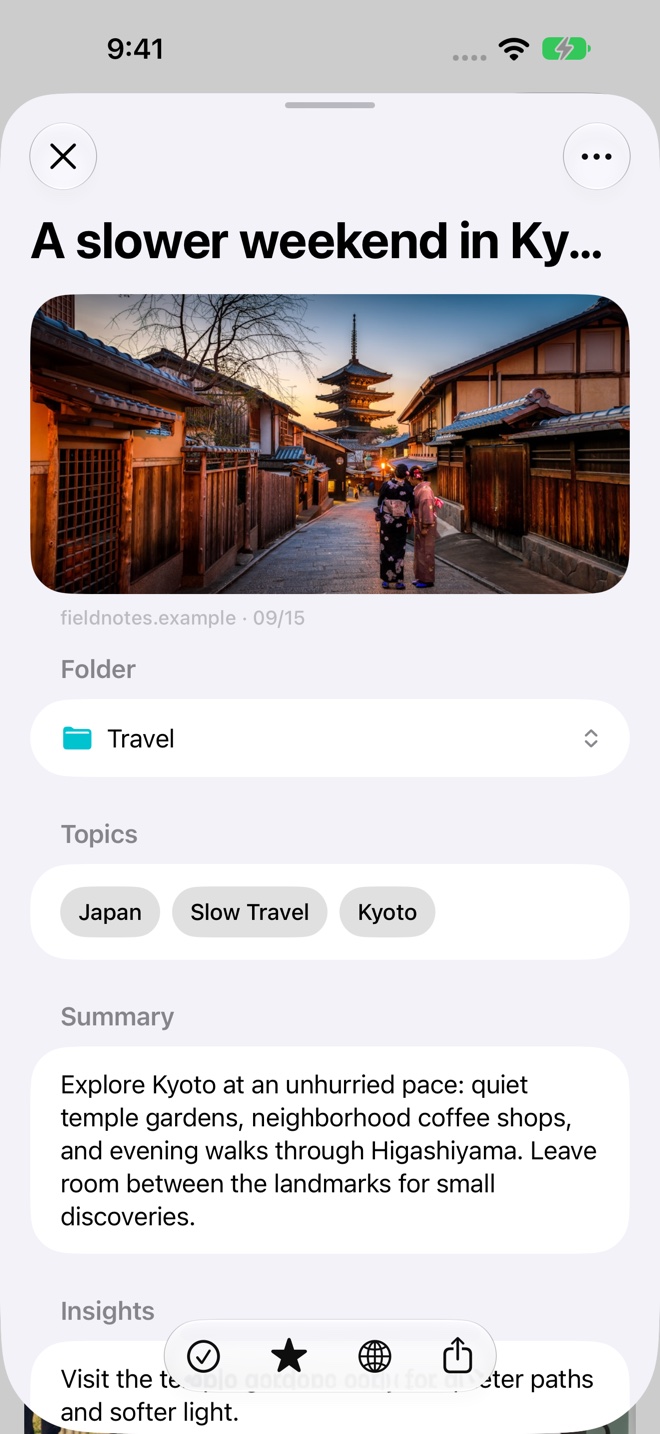
Recall helps you review a collection before choosing which original source to open. A summary can remind you what an article covers; topics and insights provide more context. Your notes keep the reason you saved it close to the source.
Summaries are part of both products
GoodLinks offers summaries and documents AI Custom Actions for reusable prompts on individual articles. Those actions have their own version, operating-system, and AI-provider requirements.
Recall prepares a summary, topics, and insights after retrieving a saved page on a compatible device with Apple Intelligence enabled. That overview appears in the item’s detail view, ready to revisit as part of your library.
When comparing AI features, consider the actual task: reviewing an article, applying a reusable action, or finding a source you have forgotten. See how Recall’s summaries work.
If finding the article is the hard part
Recall’s semantic search accepts the idea you remember. A phrase such as “quiet places in Japan” can surface relevant saved articles even when their titles use different words.
Voice Recall is designed for returning to one item. Describe the link you want to find and Recall takes you to a matching saved page. Typed search remains useful when you want to compare several results.
Match the app to your reading habits
Consider GoodLinks if a focused reader and passage-level annotations are central to your routine. Consider Recall when you collect a mix of articles, recipes, references, and other web links and want AI to help you understand and retrieve them.
GoodLinks documents imports from several services and browser bookmarks. For Recall, the current saving workflow is sharing or pasting a URL. Start with a small collection to assess the workflow, and check the device requirements.
Sources and review
Published by Recall. Competitor details were checked against the official pages below on September 17, 2026. Recommendations about which app fits a workflow are our assessment.
A few useful details
Questions about Recall vs GoodLinks.
Does GoodLinks already summarize articles?
Yes. GoodLinks offers article summaries and documents AI Custom Actions for supported versions and configurations.
Can I add my own context in Recall?
Yes. Add a note to a saved link, choose its folder, favorite it, and update its reading status.
Save it for later.
Find it when it matters.
Get Recall on the App Store Requires iOS 26, iPadOS 26, or macOS 26 or later and a compatible device with Apple Intelligence enabled. iCloud account required for sync. Microphone permission required for Voice Recall.