
Recall for iPad
A little more room
to explore your links.
Browse your collection, open a saved article, and keep its context close. Recall on iPad gives your library room to be useful in portrait or landscape.
See how it works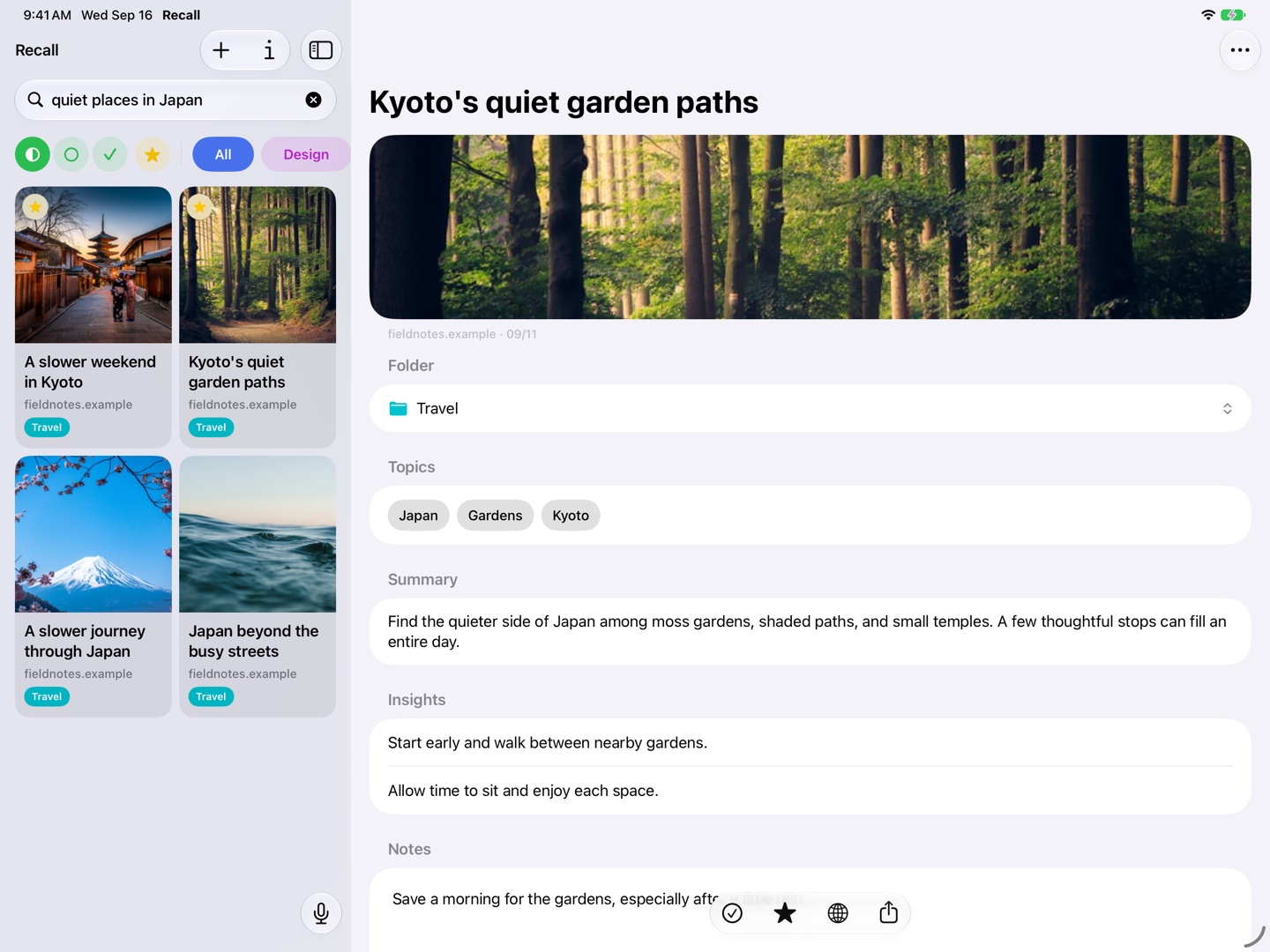
Keep the collection and the article together
On iPad, the library and selected link can sit side by side. Scan previews, choose a source, and read its summary without losing your place in the collection.
It is a comfortable way to review saved travel research or revisit a set of design references. Rotate your iPad to suit the way you are working.
Understand a page before diving in
Summaries, topics, and insights give you a starting point for each saved link. Add your own notes to record why a source matters, then open the original page when you want the details.
Folders provide the structure you choose. Search offers a different route when a remembered topic is more useful than the folder name.
Explore results with room for context
Try a phrase like “quiet places in Japan.” Semantic search finds relevant saved links, and you can select one while keeping the rest of the results visible.
The screenshot shows a sample travel collection. Recall searches your own saved library rather than the entire web.
Connected to your other Apple devices
Use iCloud sync to return to links saved on iPhone or Mac. Recall requires iPadOS 26 or later and an iPad that supports Apple Intelligence, with Apple Intelligence enabled.
An iCloud account is required for synchronization. Voice Recall also requires microphone permission.
A few useful details
Questions about Recall for iPad.
Does Recall support portrait and landscape?
Yes. You can browse and read your saved library in either orientation on iPad.
Do I need a different account for iPad?
No. Use the same iCloud account to synchronize your Recall library across supported Apple devices.
Save it for later.
Find it when it matters.
Get Recall on the App Store Requires iOS 26, iPadOS 26, or macOS 26 or later and a compatible device with Apple Intelligence enabled. iCloud account required for sync. Microphone permission required for Voice Recall.