
A home for your saved links
Useful links.
All in one place.
Save the article you want to read, the recipe you want to try, and the idea you want to revisit. Recall keeps them together in a visual library you can organize around your life.
See how it works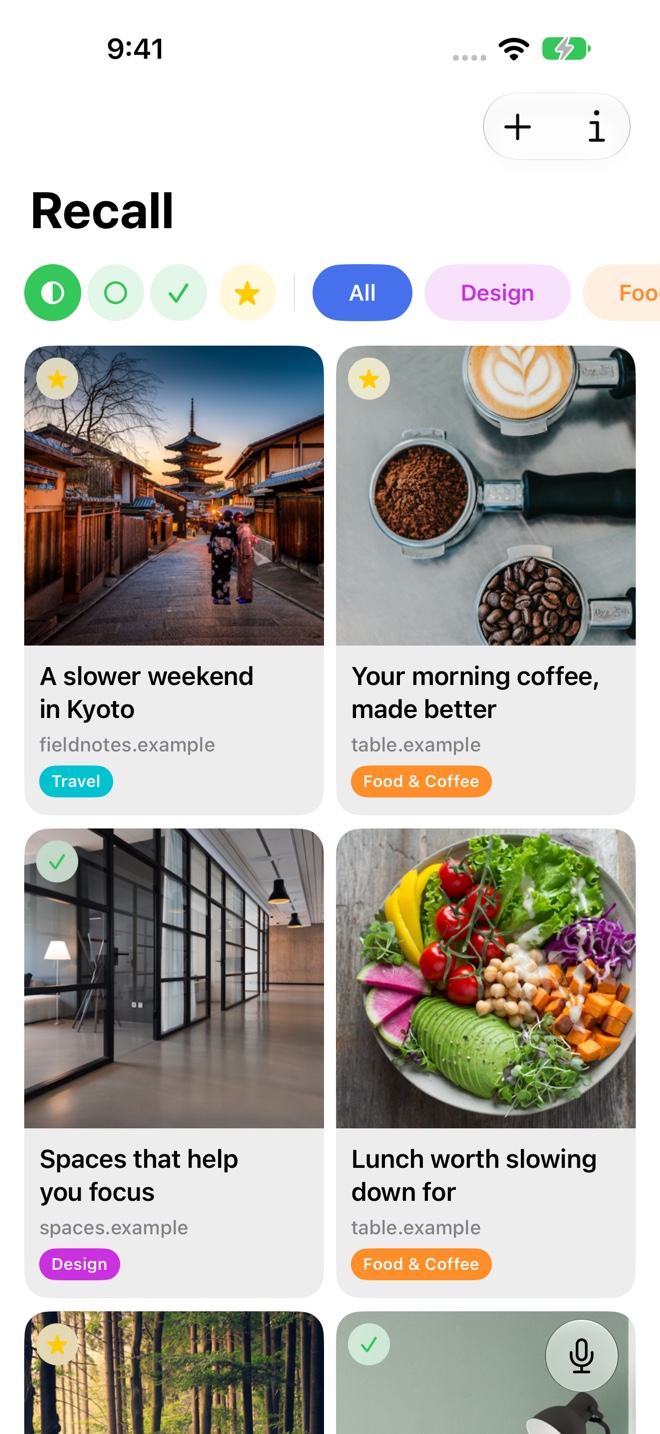
Save a link while it is useful
Use the share menu to send a web link to Recall, or paste its address into the app. Recall retrieves the page and prepares its title, preview, and AI analysis. You can then see what you saved without opening every website again.
A link can be useful before you have time to read it. Saving it gives you somewhere to return when the moment is right.
Organize around what you do
Create folders for a project, an interest, or a plan. A Travel folder might hold neighborhood guides and hotel articles. A Design folder might hold studio references and articles about materials. You choose the folders; Recall adds topics that describe the saved content.
Use favorites for links you expect to need again soon. Keep reading status separate from favorites so a useful reference can stay easy to reach after you have read it.
Keep the reason you saved it
Add a note when a title alone will not remind you why a link matters. “Compare the kitchen layout” or “Try this next weekend” can turn a saved page into a useful next step.
Your own notes sit alongside the saved item. AI summaries help you review the page itself, while your notes preserve your context.
Come back without retracing your steps
Browse a folder when you know the project. Use semantic search when you remember the idea. Use Voice Recall when describing the link out loud is quicker.
Your library can follow you across iPhone, iPad, and Mac through iCloud sync.
A few useful details
Questions about Link organization.
Does Recall put links into folders automatically?
You choose how to organize folders. Recall generates topics, summaries, and insights to help you understand saved pages.
Can I save more than articles?
You can save web links, including recipes, travel pages, and other useful sites. The preview and AI analysis depend on the content Recall can retrieve.
Save it for later.
Find it when it matters.
Get Recall on the App Store Requires iOS 26, iPadOS 26, or macOS 26 or later and a compatible device with Apple Intelligence enabled. iCloud account required for sync. Microphone permission required for Voice Recall.